LESCO Online Bill Check
09116231596202 type for checking bill
Loading your bill… Please wait
LESCO Bill Check Online
No one wants to wait in long queues just to view a monthly electricity bill. If you’re living in Lahore or any area under LESCO (Lahore Electric Supply Company), you’re in luck—checking your LESCO bill online has never been easier.
Whether you’ve misplaced your bill or simply want to check your dues before the due date, this guide covers every method, tool, and tip you need.
What is LESCO?
The Lahore Electric Supply Company (LESCO) is a public limited company established in 1998, responsible for distributing electricity across Lahore and its surrounding areas, including Sheikhupura, Okara, Kasur, and Nankana Sahib. Serving millions of residential, commercial, and industrial customers, LESCO ensures a reliable power supply and offers modern solutions like online bill checking to enhance customer convenience. As one of Pakistan’s leading power distribution companies, LESCO plays a critical role in keeping the region powered.
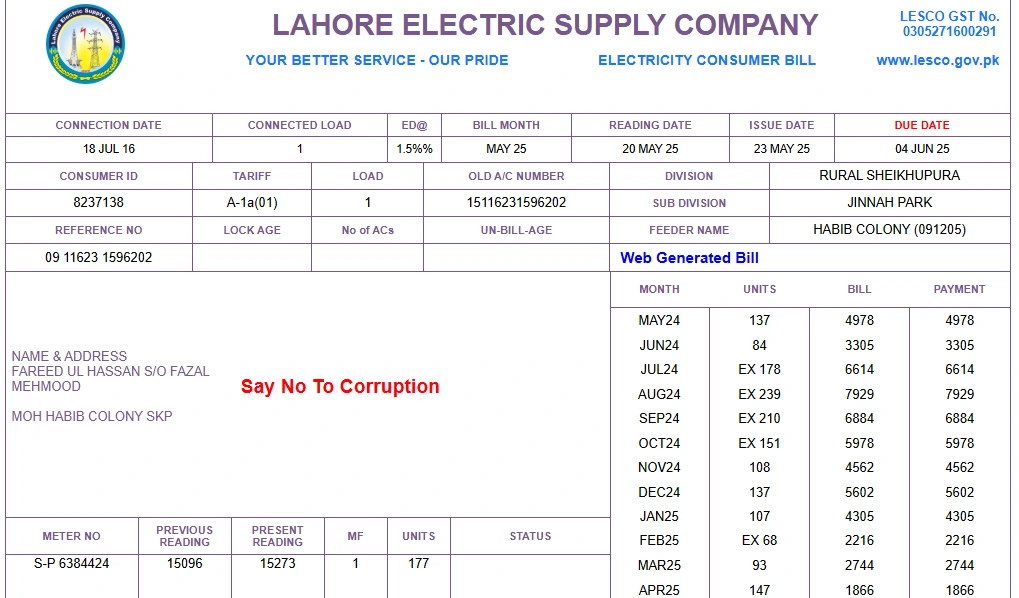
Why You Might Need to Check Your LESCO Bill Online
Benefits of Checking Your LESCO Bill Online
Checking your LESCO bill online offers several advantages that make it a preferred choice for many consumers.
Users can access their bill anytime, anywhere, using smartphone, tablet or computer, withour waiting for the physical bill to arrive.
Users can access there bill before the physical copies.
Bill are sourced directly from the lesco database which ensures accurate details about your consumptions, charges and due date.
Online bill checking is free, every lesco consumer can check their lesco bill online for free.
By opting for digital bills, user reduce paper usage, contributing to environmental sustainability.
How to Check LESCO Bill Online in 2025
Step 1: Locate Your 14-Digit Reference Number
Find your 14-digit reference number on a previous LESCO bill. It looks like this: XXXXXXXXXXXXXX. This number is unique to your electricity connection, not your name or CNIC.
Step 2: Visit Infopak.pk
Open your browser and go to Infopak.pk/lesco. Look for the section titled Bill Check.
Step 3: Enter Your Reference Number
Input your 14-digit reference number into the box. Then click ‘Submit’ or ‘View Bill’.
Step 4: View and Download Your Bill
Your bill will appear instantly. You can:
• Download as PDF
• Print the bill
• Note the due date and amount
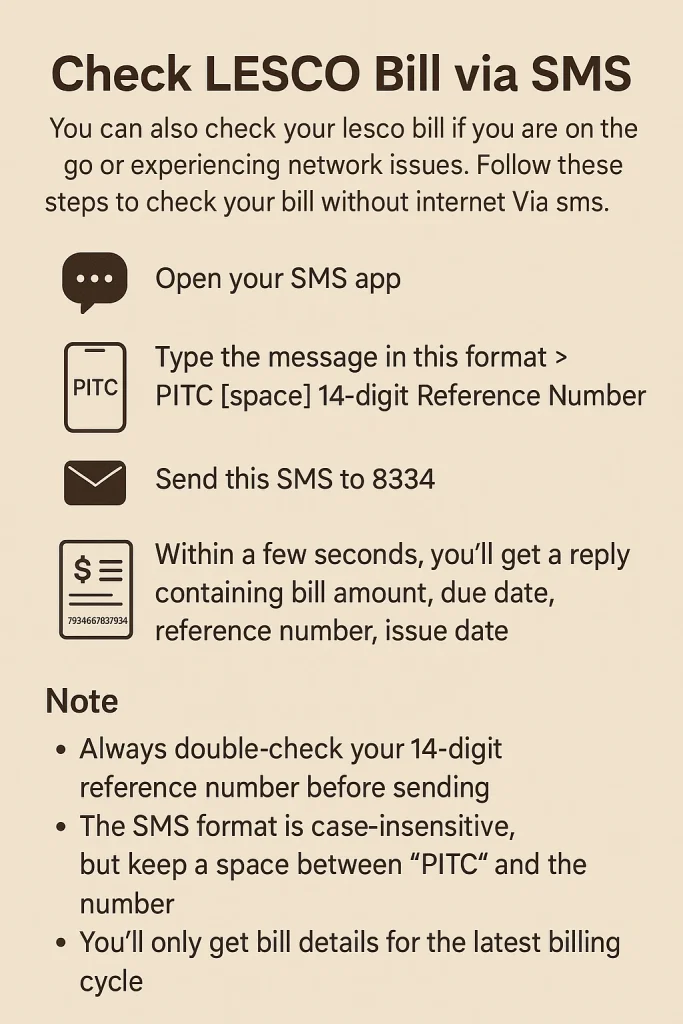
Check LESCO Bill via SMS
You can also check your lesco bill if you are on the go or experiencing network issues. Follow these steps to check your bill without internet Via sms.
- Open your SMS app
- Type the message in this format > PITC [space] 14-digit Reference Number
- Send this SMS to 8334
- Within a few seconds, you’ll get a reply containing bill amount, due date, reference number, issue date.
Note
Always double-check your 14-digit reference number before sending.
The SMS format is case-insensitive, but keep a space between “PITC” and the number.
You’ll only get bill details for the latest billing cycle.
Steps to Check Your LESCO Bill Using CNIC
Can’t find your reference number? No problem. LESCO offers a way to retrieve your bill by using your CNIC through their official portal or CCMS. Here’s how you can do it easily:
Step 1
Visit the official LESCO website or infopak.pk.
Step 2
Go to the “Check Your Bill” section.
Step 3
Look for the option that says “Check Bill by CNIC” or “Retrieve Reference Number via CNIC”.
Step 4
Enter your 13-digit CNIC number (with or without dashes, both usually work).
Step 5
Click on Submit. The system will search for your electricity connection linked to that CNIC.
Step 6
You’ll receive your 14-digit reference number or Consumer ID on the screen.
Step 7
Now go to the Bill Check page in infopak.pk, enter this reference number, and press “View Bill.”
Step 8
Your latest electricity bill will appear. You can view, download, or print it for your records or payment.
How to Download and Print LESCO Bills Online
Need a clean, printable copy of your LESCO electricity bill? Follow these simple steps to download and print LESCO bills online—fast, free, and hassle-free.
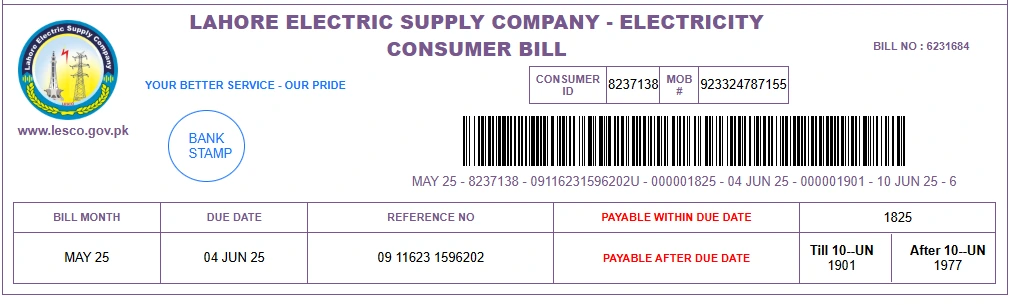
What Does Your LESCO Bill Contain?
Understanding your bill helps you avoid overcharges and monitor your usage. Key sections include
How to Pay Your LESCO Bill
Paying your LESCO electricity bill has never been more convenient. Whether you prefer going digital or sticking to traditional methods, there are multiple secure ways to pay your bill both online and offline.
Online Payment Options
Banking Apps (Mobile & Web)
- HBL Mobile
- Meezan Bank App
- UBL Digital
- Bank Alfalah
- Askari Bank
Steps:
- Log in to your banking app
- Go to “Bill Payment”
- Select “Electricity” > “LESCO”
- Enter your reference number
- Confirm payment
Digital Wallets / Payment Apps
- JazzCash
- Easypaisa
- NayaPay
- SadaPay
- Upaisa
Steps:
- Open the app or website
- Tap “Bill Payment” > “Electricity” > Choose LESCO
- Enter 14-digit reference number
- Confirm the bill details and tap Pay
ATM Machines
- Insert your ATM card
- Select “Utility Bills”
- Select LESCO
- Enter the reference number
- Make the payment
Offline Payment Methods
If you prefer paying your bill physically, LESCO still offers multiple offline payment options across all cities under its coverage.
- Visit any designated bank branch (HBL, UBL, MCB, Allied, etc.) with your printed bill and pay over the counter.
- Pay your LESCO bill at your nearest Pakistan Post office.
- Use small utility shops and kiosks with LESCO partnerships.
- Pay directly at official LESCO offices using your printed bill.
LESCO New Connection
If you’ve recently moved into a new home, built a commercial space, or want a separate meter for your property, applying for a new LESCO electricity connection is easier than ever.
Types of LESCO Connections
LESCO offers different types of new electricity connections depending on your needs
| Connection Type | Usage |
|---|---|
| Domestic | Houses, flats, apartments |
| Commercial | Shops, offices, businesses |
| Industrial | Factories, mills, heavy units |
| Agricultural | Tubewells, farms |
| Temporary | Events, construction sites |
How to Apply for a New LESCO Connection
LESCO has digitized its application process under Electricity New Connection (ENC) through www.enc.com.pk. Here’s how to apply
Visit the ENC official website: www.enc.com.pk
Click on “Apply New Connection”
Fill in the application form with
Applicant’s Name and CNIC
Property ownership documents
Type of connection (domestic, commercial, etc.)
Load requirement (in kW)
Upload scanned documents (see list below)
Submit the form and download your tracking ID or acknowledgment slip
Wait for verification, survey, and demand notice issuance
Pay the demand notice at a designated bank
Once verified and payment is confirmed, meter installation will be scheduled
Documents Required for LESCO New Connection
| Required Documents |
|---|
| Copy of CNIC (applicant & witness) |
| Property ownership proof (registry, allotment, etc.) |
| No Objection Certificate (if not the owner) |
| Affidavit of non-default (by applicant) |
| Neighbor’s reference number (optional but helpful) |
| Load/usage requirement details |
LESCO Bill Peak Hours
Did you know your electricity bill can vary significantly based on what time of day you use your appliances? LESCO follows peak, off-peak, and normal hours tariff slabs, and using electricity during peak hours can lead to higher charges per unit.
Understanding LESCO’s Time of Use (TOU) schedule can help you plan your usage smartly—and reduce your monthly bill.
| Season | Time Slot | Category | Unit Rate (PKR/kWh) | Description |
|---|---|---|---|---|
| Summer (Apr–Oct) | 6:30 PM – 10:30 PM | Peak Hours | PKR 35 – PKR 42 | Highest electricity rates apply; avoid heavy usage. |
| All other hours | Off-Peak Hours | PKR 18 – PKR 25 | Lower charges; best time for high-consumption appliances. | |
| Winter (Nov–Mar) | 6:00 PM – 10:00 PM | Peak Hours | PKR 35 – PKR 42 | Rates increase; reduce usage during these hours. |
| All other hours | Off-Peak Hours | PKR 18 – PKR 25 | Cost-effective time for daily electrical needs. |
LESCO Coverage Areas
LESCO (Lahore Electric Supply Company) supplies electricity to five key districts in Punjab, Pakistan.
| District | Circles | Divisions | Sub‑divisions |
|---|---|---|---|
| Lahore | North, Central, Eastern, South-East | 16 | ~110 |
| Kasur | Kasur Circle | 5 | ~30 |
| Okara | Okara Circle | 5 | ~23 |
| Sheikhupura | Sheikhupura Circle | 4 | ~18 |
| Nankana | Nankana Circle | 4 | ~16 |
Frequently Asked Questions (FAQS)
How can I apply for a new LESCO connection?
You can apply online through the official Electricity New Connection (ENC) portal at www.enc.com.pk. Just fill out the form, upload your documents, and track your application online.
What documents are required for a new LESCO electricity connection?
You’ll need
CNIC copy of the applicant and witness
Property ownership proof (e.g., registry or allotment letter)
No Objection Certificate (NOC), if you’re not the property owner
Affidavit of non-default
Load requirement details
How long does it take to get a new meter installed by LESCO?
If everything is in order, it typically takes 15 to 30 days after payment of the demand notice. However, delays can occur due to document verification, transformer unavailability, or incomplete forms.
How much does a LESCO new connection cost?
It depends on
Your load requirement (in kilowatts)
Type of connection (single-phase or three-phase)
Distance from the main line and infrastructure required
You’ll receive a demand notice with exact charges after your application is processed.
Can I apply for a LESCO meter connection without owning the property?
Yes, but you must provide a No Objection Certificate (NOC) from the property owner and include their CNIC copy with the application.
Can I track my new connection application online?
Yes. After submitting your application on the ENC portal, you’ll receive a tracking number that allows you to check the current status anytime at www.enc.com.pk.
What type of electricity connections does LESCO offer?
LESCO offers
Domestic connections (residential)
Commercial connections (shops/offices)
Industrial connections (factories/plants)
Agricultural and temporary connections
Where can I get help if my new connection application is delayed?
You can
Call the LESCO helpline at 111-000-118
Visit your nearest LESCO subdivision office
Email LESCO through their official portal
Is there any way to speed up the new connection process?
To avoid delays
Make sure all documents are complete and valid
Use the correct CNIC and ownership proof
Pay the demand notice as soon as it’s issued
Regularly track your application online
Conclusion
Managing your electricity with LESCO has never been easier. From checking your bill online, retrieving it via CNIC, downloading and printing, to applying for a new connection or understanding peak hours—everything is now accessible in just a few clicks. Whether you prefer online tools or offline support, LESCO provides multiple convenient options for every consumer. Stay informed, pay on time, and reduce your electricity expenses with smart usage habits and the right tools.